Head-to-Head
MultiDeco vs Dive Kit
Same Bühlmann engine. Dive Kit plans the what-ifs around it.
Both run Bühlmann ZH-L16C with gradient factors, and our published cross-reference shows the two land close on 33 scenarios. The difference is what happens around the schedule: Dive Kit computes every contingency in one pass, lets you build your own failure scenarios, tune the engine per plan, and place a bailout anywhere in a rebreather dive. MultiDeco computes one plan at a time.


The Common Ground
The algorithm is the same, and the comparison is published.
Before the differences, here's what's identical.
Bühlmann ZH-L16C
Sixteen tissue compartments with adjustable Gradient Factors (default 50/80). The same model used by Shearwater, Garmin, and most modern tech-diving computers.
Cross-checked against MultiDeco
Dive Kit's deco engine is cross-checked against MultiDeco across open-circuit and CCR profiles, including trimix, lost-gas contingencies, and oxygen-break protocols.
Same gas switch rules
Both cap a lean mix at 1.4 bar, a mid mix at 1.5 and a rich mix at 1.6 by oxygen fraction, and both insert oxygen breaks automatically. In the published captures every gas switch lands within one 3 m stop.
Agreement with MultiDeco shows the math matches. It does not show that a plan is safe: both planners run the same model, and no model guarantees a safe dive. What differs is how far each planner lets you stress a plan before the dive.
What Actually Changes Between Them
Each difference shown side by side, with screenshots.
Data entry
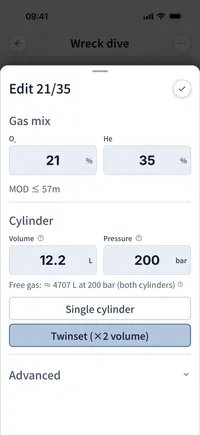
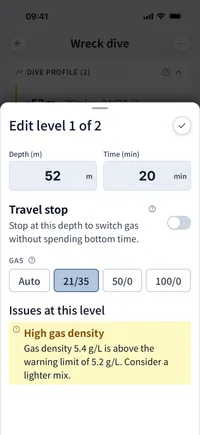
MultiDeco uses a column of scroll-wheels, pick depth, time, O₂, He one digit at a time. Dive Kit uses native labelled inputs and shows END, gas density, and PPO₂ live as you type, so you catch a bad mix before you save it.

MultiDeco
Dive Kit
Inputs and results, on the same screen
MultiDeco mixes gases and dive segments into one flat list, then sends you to a separate Calculate screen. Dive Kit splits Gases and Dive Profile into two cards on a single screen, with the live Runtime / TTS / safety status pinned to the bottom, so editing a level updates the verdict instantly.
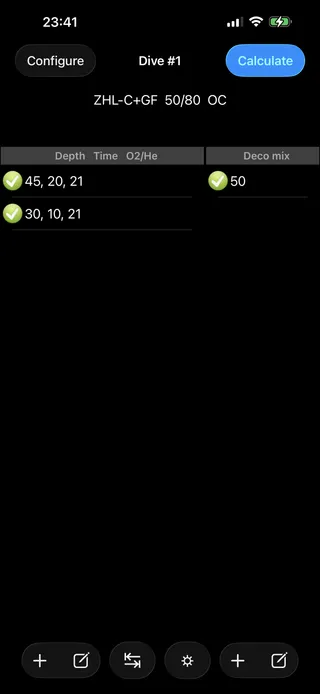
MultiDeco
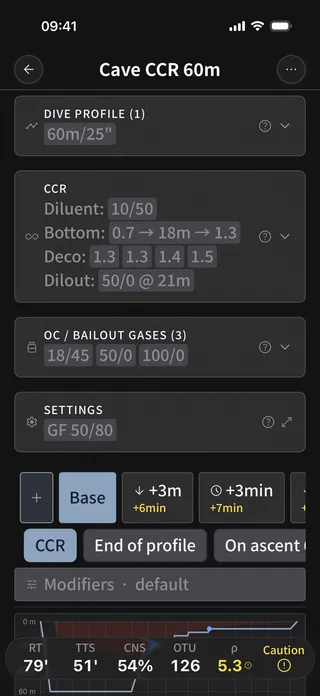
Dive Kit
Reading the deco schedule
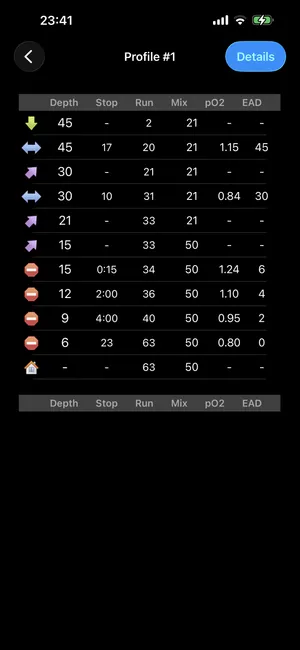
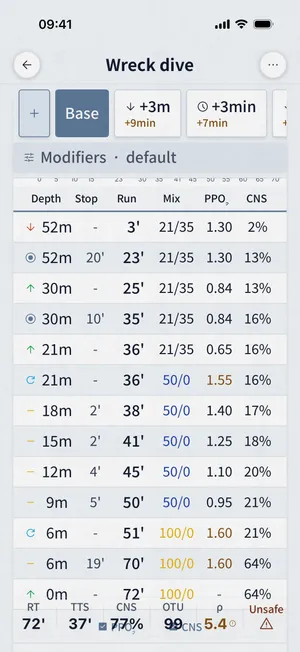
MultiDeco prints a plain text table with depth, stop, run, mix, pO₂ and EAD columns. Dive Kit gives the plan a name, plots the dive profile, lays the contingency tabs across the top, colour-codes warnings, and lets you toggle PPO₂ and CNS columns on demand.
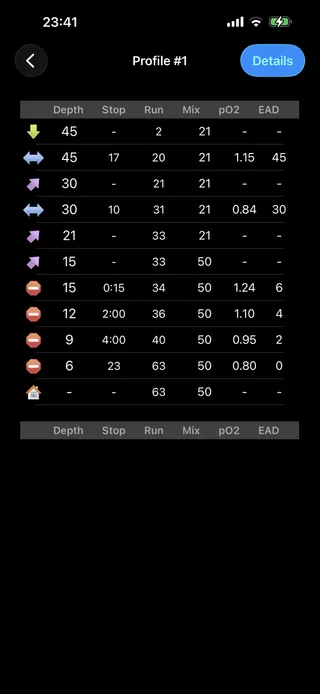
MultiDeco
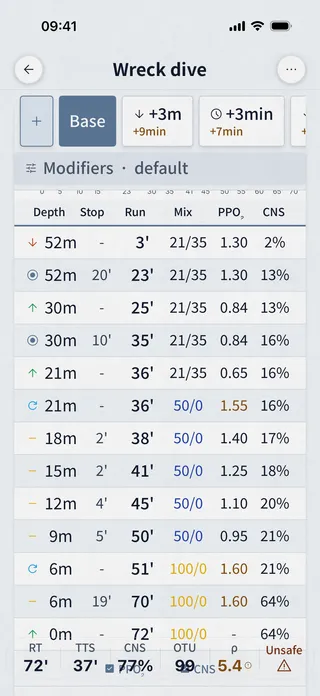
Dive Kit
Plan summary
MultiDeco hands you a textual report, CNS, OTU, decozone, gas density, gas usage. Dive Kit lays the same metrics in a card grid (TTS, RT, AP, CNS, OTU, Density), each cell showing the delta against the base plan so you can see the cost of any contingency at a glance.
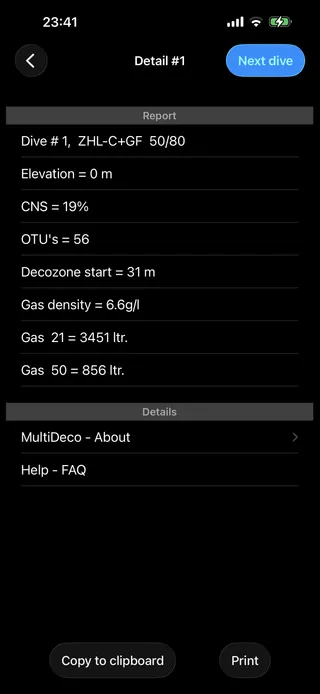
MultiDeco
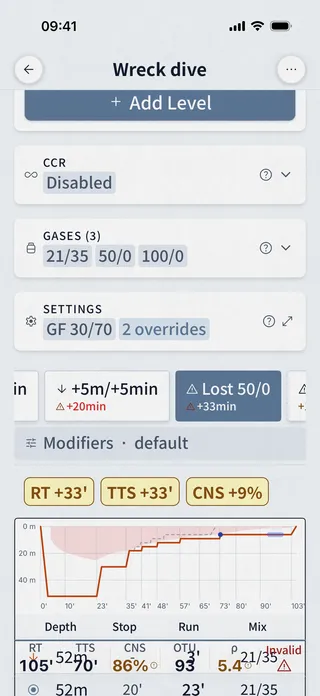
Dive Kit
Per-cylinder gas consumption
Only Dive Kit. Each cylinder gets a colour-coded usage bar, used vs remaining bar and litres, recalculated for every contingency scenario, with explicit warnings for low-gas, gas density, and END limits.
Dive Kit only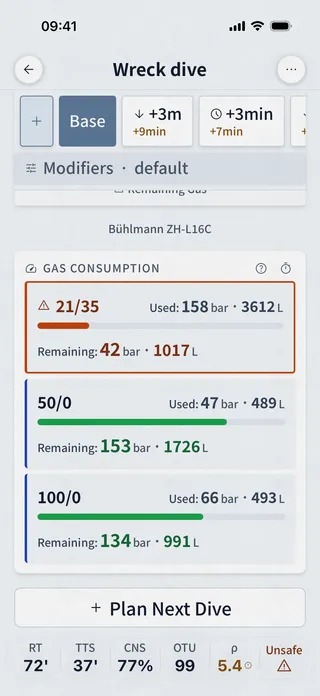
Plan issues, surfaced
Only Dive Kit. A dedicated Plan Issues sheet flags gas density above 6.2 g/L, END over 30 m, low gas reserves, narcosis, and hypoxia risk, colour-coded by severity. MultiDeco surfaces gas density and CNS only as numbers in the report.
Dive Kit only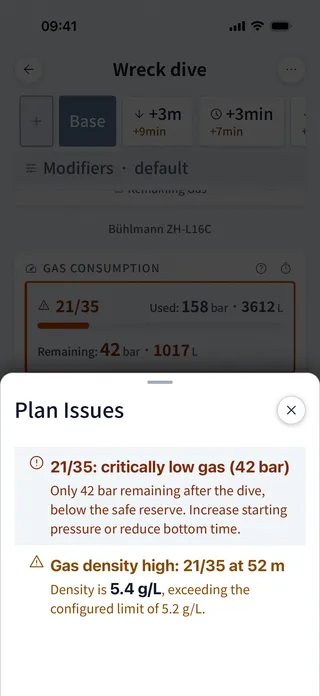
Contingencies, what-ifs and plan variants
Dive Kit computes +3 m, +5 m, +3 min, +5 min and one lost-gas tab per cylinder in a single pass. A builder adds your own scenarios: lose a named gas at a chosen point in the dive, stack a depth or time delta on top, give it a name. Plan modifiers change the working and deco breathing rate, add a stress burst over a window, or hold you at depth before the ascent, on any scenario. Named variants like "Longer Bottom" sit beside the base plan for comparison. MultiDeco plans one dive at a time.
Dive Kit only 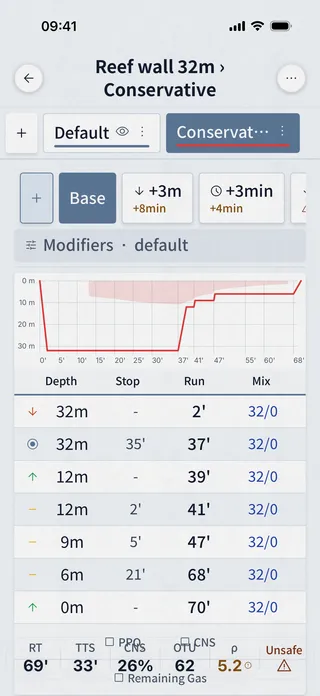
Sharing the plan
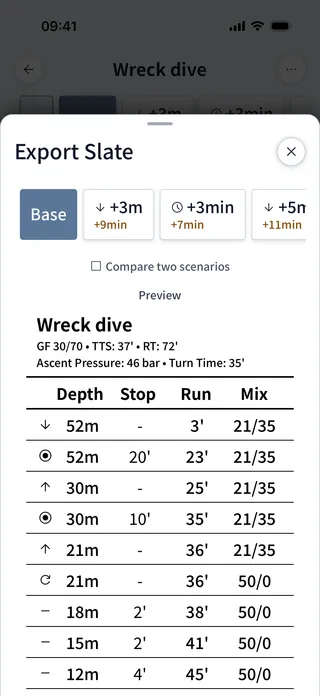
Dive Kit shares plans via URL or QR code, your buddy scans, sees the full plan in any browser. The Slate Export renders a printable image sized for an underwater wrist slate, with optional PPO₂ and CNS columns. MultiDeco offers Copy to clipboard and Print.
Dive Kit only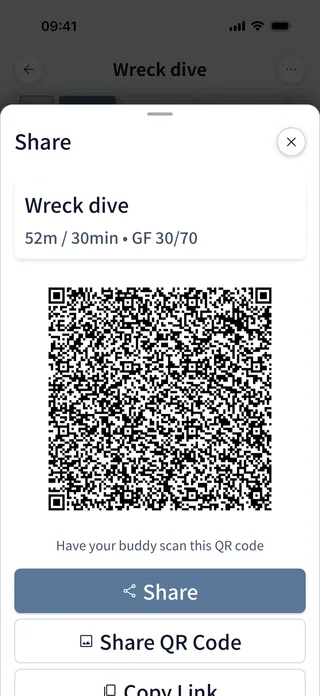
Companion tools
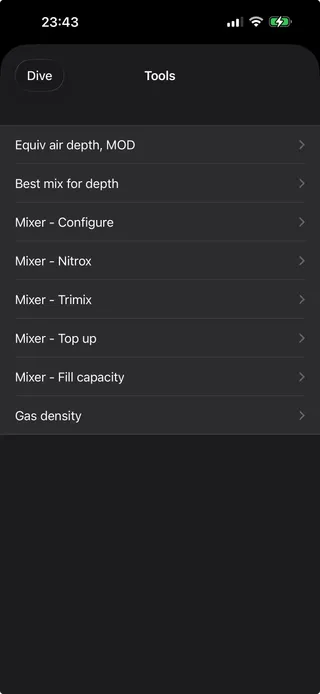
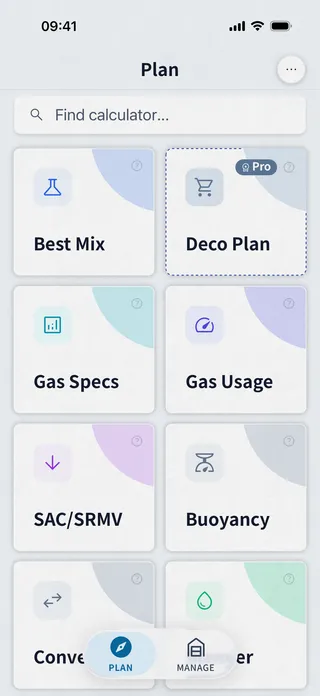
MultiDeco's Tools tab is a list of mixers (configure, nitrox, trimix, top-up, fill capacity) and EAD/MOD. Dive Kit ships 11+ tools, Best Mix, Gas Specs, Gas Usage, SAC/RMV, Buoyancy, Converter, Blender, Mix Result, Cylinders, Dive Signals, each with its own onboarding tutorial.
MultiDeco
Dive Kit
Platform & price
MultiDeco is a macOS / Windows / Linux / iOS / iPadOS / Android desktop-style app, sold per platform (≈$49 each). Dive Kit is iOS + Android only, $24.99 lifetime or $4.99/month for the Deco Planner, every other tool is free, every update included.
Feature-by-feature
Every notable difference in one table, honest in both directions.
| Feature | Dive Kit | MultiDeco | Notes |
|---|---|---|---|
| Bühlmann ZH-L16C | Yes | Yes | Both implement the same model with adjustable Gradient Factors. |
| Gradient Factors | Yes | Yes | Same default 50/80 in both apps. |
| VPM-B algorithm | No | Yes | MultiDeco offers VPM-B as an alternative; Dive Kit is Bühlmann-only. |
| Published cross-reference against another planner | Yes | No | Dive Kit publishes 33 scenarios run through both planners, with the inputs, the outputs and a written note on every difference. MultiDeco publishes no comparison of its own. |
| Multi-level profiles | Yes | Yes | Both plan unlimited levels with an optimised ascent. Dive Kit reorders levels by drag and tags each one with PPO₂, END, gas density and no-stop time. |
| Deco stops woven in front of a shallower level | Yes | Yes | A level above the current ceiling gets every owed stop first. Dive Kit added this in 2.10.0, and our captures show MultiDeco starting to hold at the same 36 m. |
| When the gas switch happens between two levels | Where the gas is safe | On arrival | Dive Kit switches before descending to a deeper level. In our capture MultiDeco carried EANx50 down to 40 m, about 2.5 bar of oxygen. |
| Travel time counted inside level time | Your choice | On deeper levels | Dive Kit has an Include travel in level time toggle, so you can plan either convention. MultiDeco folds the travel into the time you type for the first level and for any deeper level. |
| Multi-gas with auto-switching | Yes | Yes | Auto switch to deco gas at MOD in both apps. |
| CCR / bailout planning | Yes | Yes | Both plan closed circuit. Dive Kit adds a depth-stepped deco setpoint schedule, dilout switches, a breathable open-circuit diluent, and a bailout gas check on every view. Dive Kit can start a bailout at the end of the profile, after any level, at any run time, or on the ascent at a depth. MultiDeco bails from the end of the profile. |
| Bailout starts on the richest breathable gas | Yes | Yes | Both leave the loop onto the richest mix usable at the bail depth, so the order of your cylinders cannot change the schedule. Baltic answers the same way. |
| Contingency tabs (+depth/+time/lost gas) | Yes | Partial | Dive Kit computes +3m, +5m, +3min, +5min and one lost-gas tab per cylinder in a single pass, plus custom scenarios that can fail partway through the dive. |
| Named plan variants | Yes | No | Dive Kit lets you save named scenarios (e.g. "Longer Bottom") and overlay them. |
| Dive profile graph | Yes | Yes | Dive Kit draws the ceiling as a filled zone and overlays variants, contingencies and bailout plans as ghost lines. |
| Unified gas list (separate from profile) | Yes | No | Dive Kit separates Gases from Dive Profile for cleaner editing. |
| Live END / density / PPO₂ on input | Yes | No | Dive Kit shows safety values as you edit. |
| Plan Issues sheet (warnings panel) | Yes | No | Dive Kit sorts issues into four severities with the numbers behind them, isobaric counterdiffusion on a gas switch and a raised GF high included, and recomputes them for every scenario. |
| Per-cylinder consumption bars | Yes | Partial | Dive Kit shows used and remaining pressure and litres per cylinder, per scenario, and prices bailout in two phases: working rate to the first stop, deco rate above it. |
| Automatic oxygen breaks during deco | Yes | Yes | Both insert oxygen breaks automatically on a configurable interval and length. Dive Kit can also run them on the CCR loop, at a break setpoint of its own. |
| QR / URL plan sharing | Yes | No | Dive Kit shares to any browser; MultiDeco offers clipboard / print. |
| Underwater slate export image | Yes | Partial | Dive Kit exports an A6 PDF, an image or plain text, and an A5 two-up sheet comparing two scenarios. MultiDeco prints a text table. |
| Built-in algorithm tutorials | Yes | No | Dive Kit ships in-app tutorials for every tool and the Bühlmann model. |
| Companion planning tools | 11 free | ~5 | Dive Kit ships 11 free tools (best mix, gas blender, SAC/RMV, buoyancy, checklists and more); MultiDeco includes mixers plus EAD/MOD. |
| Repetitive dive planning | Yes | Yes | Both track tissue saturation across surface intervals. |
| Works 100% offline | Yes | Yes | Both run entirely on-device. |
| Platforms | iOS · Android | macOS · Win · Linux · iOS · Android | MultiDeco: macOS / Windows / Linux / iOS / iPadOS / Android. Dive Kit: iOS + Android (web plan viewer for shared plans). |
| Price | $24.99 lifetime | ≈$49 mobile · ~$90 desktop | MultiDeco ≈$49 per platform. Dive Kit $24.99 lifetime or $4.99/mo (other 11+ tools free). |
What Dive Kit adds
- A custom contingency builder: lose a gas, say when you lose it, and add a depth or time delta
- Plan modifiers for a working and deco breathing rate, a stress burst over a window, and a delay before the ascent
- A full CCR rig: a depth-stepped deco setpoint schedule, dilout switches, and a diluent you can flag as breathable open circuit
- Plan sharing by link, QR code and deep link, with a web viewer that renders the plan for a buddy who does not have the app
- Slate export as an A6 PDF, an image or plain text, plus an A5 sheet comparing two scenarios
- Stop time rounding you set yourself, 1 second, 30 seconds or a whole minute, applied inside the engine
- Real-gas cylinder contents from NIST compressibility data, so a fill lands where your analyser reads it
- A bottom time finder that solves for your gas reserve or a time-to-surface budget
- Four ways to place a bailout: the end of the profile, after any level, at any run time, or on the ascent at a depth
- Engine settings you tune per plan: gradient factors, last stop depth, ascent and descent rates, PPO₂ caps per gas, oxygen breaks, gas switch behaviour, and what happens when a cylinder runs out
- Eleven free companion tools around the planner, eight languages, and imperial units throughout
Frequently asked questions
MultiDeco vs Dive Kit, the questions tech divers ask most.
Do MultiDeco and Dive Kit use the same decompression algorithm?
What is the main difference between MultiDeco and Dive Kit?
Is Dive Kit cheaper than MultiDeco?
Does MultiDeco support VPM-B?
Can I share dive plans from MultiDeco or Dive Kit?
Which platforms does each app run on?
How closely do Dive Kit's numbers match MultiDeco's?
Why does Dive Kit switch gas at a different moment than MultiDeco?
Do both planners put deco stops in front of a level you planned?
Does Dive Kit support CCR / rebreather diving?
Which has a better safety-warning system?
About this comparison
MultiDeco is a product of HHS Software. Screenshots are reproduced under nominative fair use for the purpose of feature comparison. All trademarks belong to their respective owners. Comparison reflects publicly available app behaviour and pricing as of early 2026, features change; please verify against the current version of each app before making a purchase decision.
Get Dive Kit
Eleven tools free. Deco Planner: free trial, then $4.99/month or $24.99 lifetime.