正面对决
MultiDeco vs Dive Kit
同一套 Bühlmann 引擎。Dive Kit 把它周围的各种假设也一并规划。
两者均运行带梯度系数的 Bühlmann ZH-L16C,我们公开的交叉核对显示,33 个场景下两者结果接近。区别在于减压表之外:Dive Kit 一次算出全部应急方案,让你自建故障场景、按计划微调引擎,并在循环呼吸器潜水的任意位置设置 bailout。MultiDeco 一次只算一个计划。


共同基础
算法相同,对比数据已公开。
在谈差异之前,先看看两者完全一致的地方。
Bühlmann ZH-L16C
16 个组织舱,支持可调梯度系数(GF,默认 50/80)。这是 Shearwater、Garmin 及大多数现代技术潜水电脑所采用的模型。
与 MultiDeco 交叉验证
Dive Kit 的减压引擎已针对开放回路(OC)和 CCR 剖面与 MultiDeco 进行交叉验证,涵盖三混气、失气应急方案和空气间歇协议。
相同的换气规则
两者都按氧含量设上限:贫氧混合气 1.4 bar,中等 1.5,富氧 1.6,并且都自动插入氧气间歇。在公开的记录里,每次换气都落在同一个 3 m 停留之内。
与 MultiDeco 一致,说明计算结果吻合,并不说明方案安全:两款规划器使用同一个模型,而没有任何模型能保证潜水安全。不同的是,每款规划器在下水前允许你把计划推敲到什么程度。
两者的实际差异
每项差异均以截图并排展示。
数据录入
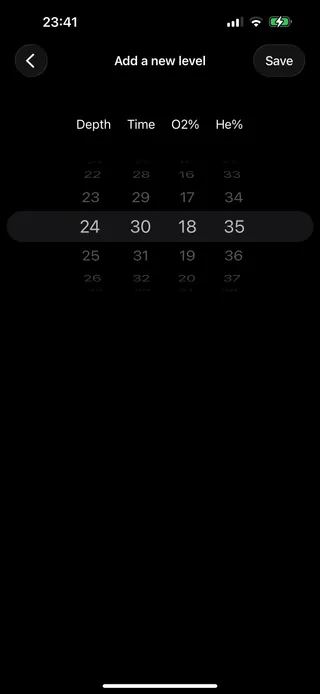
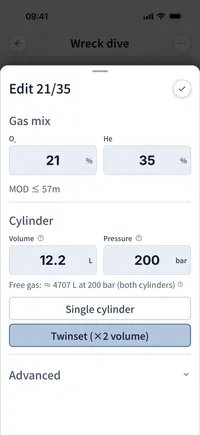
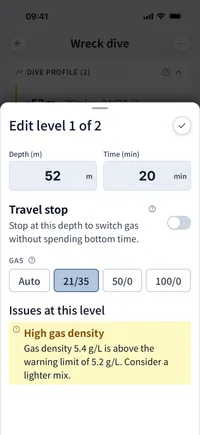
MultiDeco 使用一列滚轮逐位选择深度、时间、O₂、He。Dive Kit 使用带标签的原生输入框,并在输入时实时显示 END、气体密度和 PPO₂,让你在保存前发现问题混合气。
MultiDeco
Dive Kit
输入与结果同屏显示
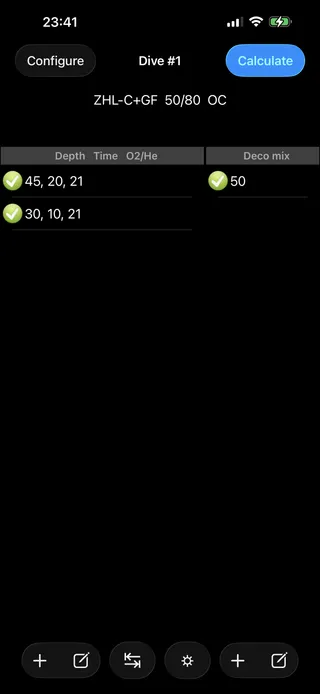
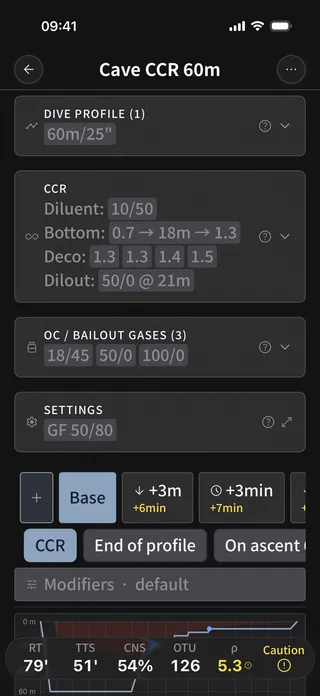
MultiDeco 将气体和潜水段混合为一个平铺列表,再跳转至独立的计算界面。Dive Kit 在单一界面上将气体和潜水剖面分为两张卡片,底部固定显示实时累计时间、TTS 和安全状态,编辑任一深度段后结果即时更新。
MultiDeco
Dive Kit
阅读减压时间表
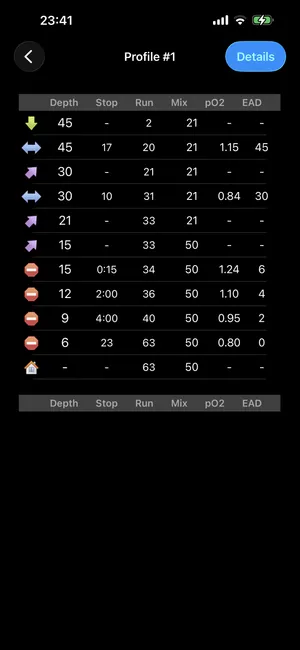
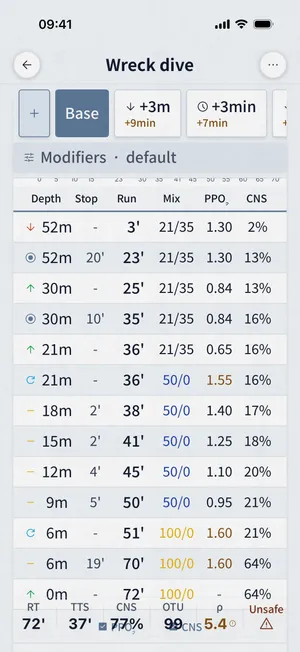
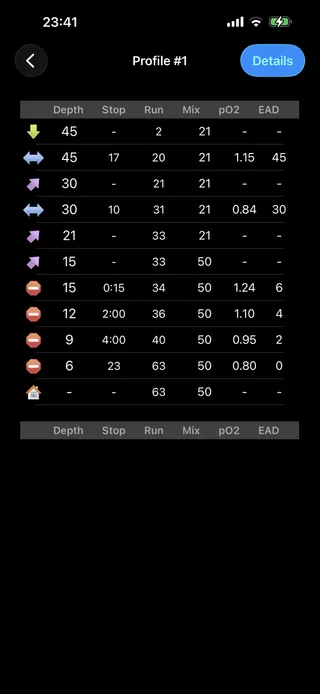
MultiDeco 输出含深度、停留、累计、混合气、pO₂ 和 EAD 列的纯文本表格。Dive Kit 为方案命名,绘制潜水剖面,在顶部排列应急方案标签,以颜色标注警告,并可按需切换 PPO₂ 和 CNS 列。
MultiDeco
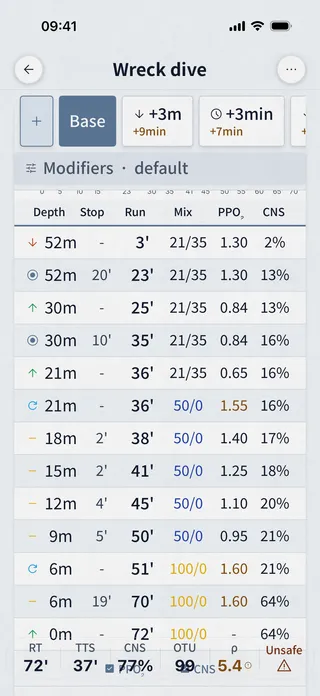
Dive Kit
方案摘要
MultiDeco 提供文字报告,含 CNS、OTU、减压区、气体密度和耗气量。Dive Kit 将相同指标以卡片网格呈现(TTS、RT、AP、CNS、OTU、密度),每格显示相对基础方案的差值,让你一眼看出每个应急方案的代价。
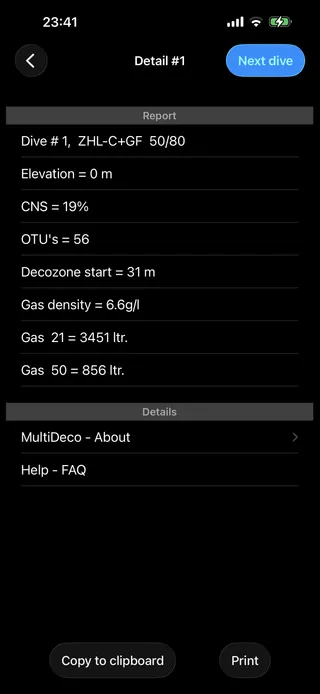
MultiDeco
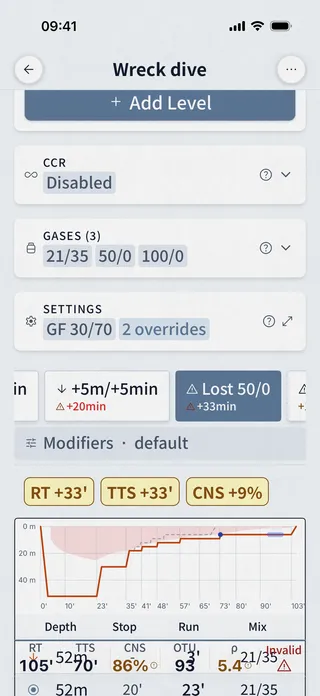
Dive Kit
各气瓶耗气量
仅 Dive Kit 提供。每只气瓶均有色彩编码的用量条、已用/剩余量和升数,并针对每个应急方案重新计算,同时提供低气量、气体密度和 END 限制的明确警告。
Dive Kit 独有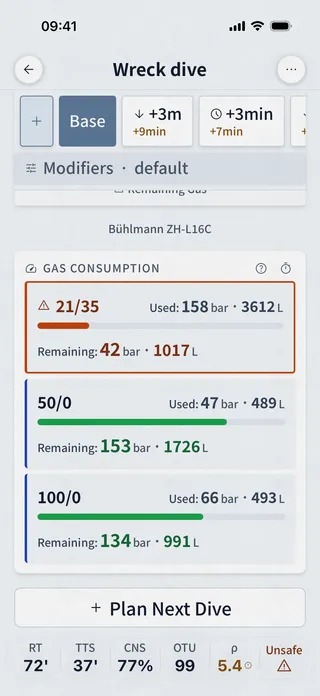
方案问题提示
仅 Dive Kit 提供。专用的方案问题面板标记以下问题:气体密度超过 6.2 g/L、END 超过 30 m、储备气量不足、麻醉风险和低氧风险,按严重程度以颜色区分。MultiDeco 仅在报告中以数字形式显示气体密度和 CNS。
Dive Kit 独有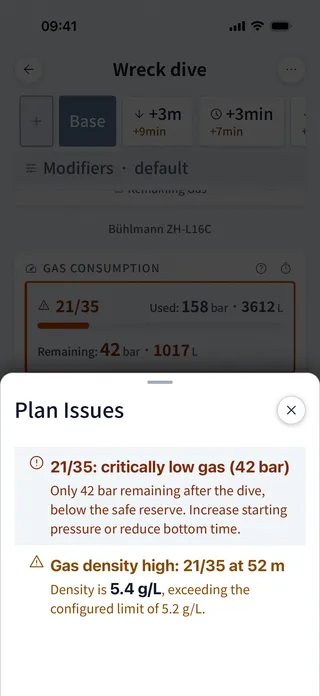
应急方案、假设场景与计划变体
Dive Kit 一次算出 +3 m、+5 m、+3 min、+5 min 以及每个气瓶一个的失气标签页。构建器可添加自定义场景:在潜水的指定点失去某个气体,再叠加深度或时间增量,并命名。计划修正项可修改底部和减压阶段的耗气率,在某个时间窗加入应激峰值,或在上升前让你在深度停留,任何场景都适用。“更长底部时间”等命名变体与基础计划并列对比。MultiDeco 一次只规划一次潜水。
Dive Kit 独有 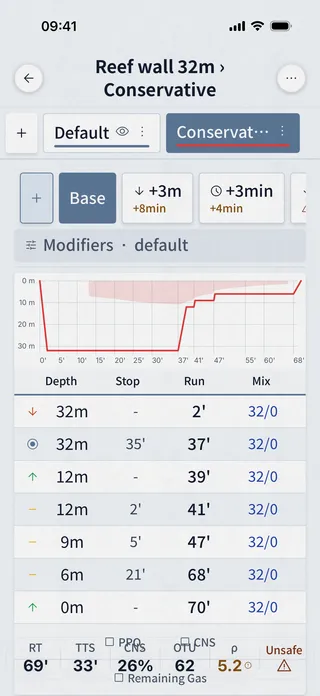
分享方案
Dive Kit 通过 URL 或二维码分享潜水方案,你的潜伴扫码后即可在任意浏览器中查看完整计划。Slate 导出功能可生成适合水下手腕板尺寸的可打印图片,支持可选的 PPO₂ 和 CNS 列。MultiDeco 提供复制到剪贴板和打印功能。
Dive Kit 独有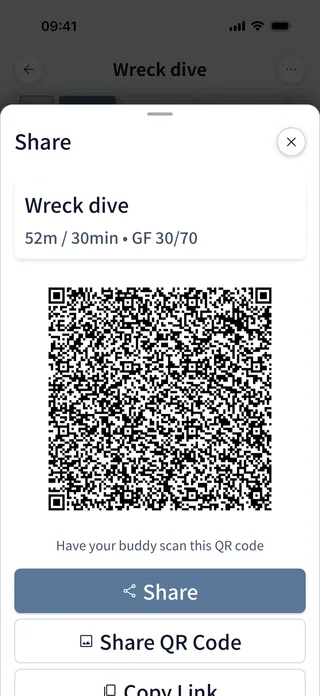
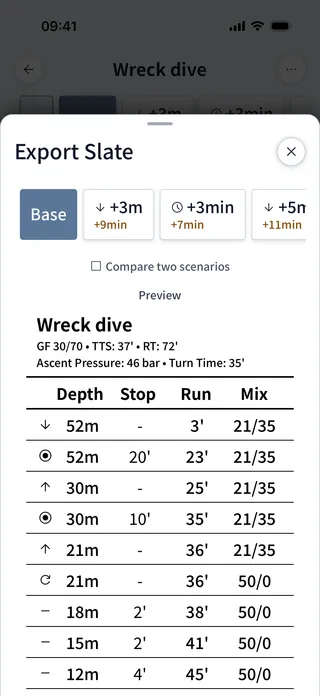
配套工具
MultiDeco 的工具标签页提供多种配气工具(标准配置、高氧、三混气、补气、充气容量)和 EAD/MOD 计算。Dive Kit 内置 11 款以上工具:最佳混合气、气瓶参数、气体用量、SAC/RMV、浮力、单位换算、配气规划、混气计算器、气瓶数据库、潜水手势等,每款工具均附有入门教程。
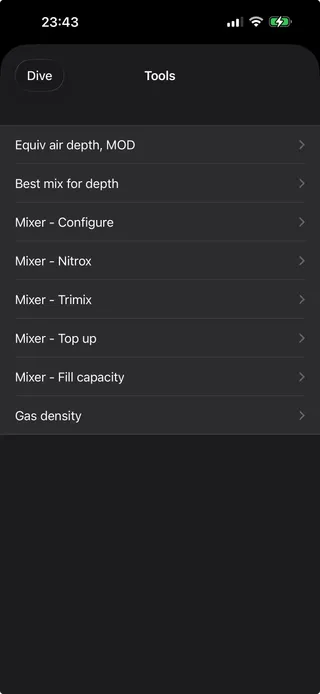
MultiDeco
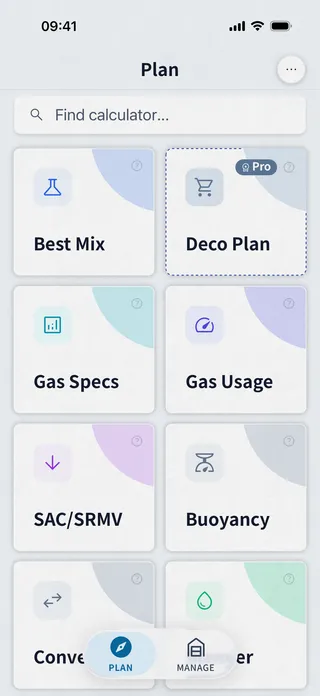
Dive Kit
平台与价格
MultiDeco 支持 macOS / Windows / Linux / iOS / iPadOS / Android,按平台单独购买(每平台约 $49)。Dive Kit 仅支持 iOS 和 Android,减压规划功能售价 $24.99(终身版)或 $4.99/月,其他所有工具均免费,所有更新包含在内。
功能对比
一张表格涵盖所有重要差异,客观呈现两款应用的优劣。
| 功能 | Dive Kit | MultiDeco | 备注 |
|---|---|---|---|
| Bühlmann ZH-L16C | 支持 | 支持 | 两款应用均采用相同算法模型,支持调节梯度系数(GF)。 |
| 梯度系数 | 支持 | 支持 | 两款应用默认值均为 GF 50/80。 |
| VPM-B 算法 | 不支持 | 支持 | MultiDeco 提供 VPM-B 作为备选算法;Dive Kit 仅支持 Bühlmann 算法。 |
| 已发布的与其他规划器的交叉对照 | 支持 | 不支持 | Dive Kit 公开了在两个规划器中跑完的 33 个场景,包含输入、输出以及对每一处差异的书面说明。MultiDeco 没有发布自己的对比。 |
| 多深度段剖面 | 支持 | 支持 | 两者都支持不限数量的层级并优化上升。Dive Kit 可拖动重排层级,并为每个层级标注 PPO₂、END、气体密度和免减压时间。 |
| 在较浅层级之前插入减压停留 | 支持 | 支持 | 高于当前天花板的层级会先完成所有应做的停留。Dive Kit 在 2.10.0 中加入这一行为,我们的记录显示 MultiDeco 同样从 36 m 开始停留。 |
| 两个层级之间何时换气 | 在气体安全的深度 | 到达后 | Dive Kit 在下潜到更深层级之前换气。我们的记录中,MultiDeco 把 EANx50 带到了 40 m,约 2.5 bar 的 PPO₂。 |
| 层级时间是否包含往返时间 | 可自行选择 | 更深层级始终包含 | Dive Kit 提供把往返时间计入层级时间的开关,两种惯例都能规划。MultiDeco 会把往返时间算进第一层级以及任何更深层级所填的时间里。 |
| 多气源自动切换 | 支持 | 支持 | 两款应用均支持在 MOD 处自动切换至减压用气。 |
| CCR / 备用气源(bailout)规划 | 支持 | 支持 | 两者都支持闭路循环。Dive Kit 另有按深度分级的减压 setpoint 方案、dilout 切换、可开放式呼吸的稀释气,以及在每个视图上运行的脱险气体检查。Dive Kit 可在剖面结束、任一段之后、任一累计时间,或上升中的某个深度开始脱险;MultiDeco 只能从剖面结束开始。 |
| 脱险从可呼吸的最富氧气体开始 | 支持 | 支持 | 两者都以脱险深度上可用的最富氧混合气离开回路,因此气瓶顺序不会改变方案。Baltic 的答案相同。 |
| 应急方案标签(+深度/+时间/失气) | 支持 | 部分支持 | Dive Kit 一次计算 +3m、+5m、+3min、+5min,并为每支气瓶生成一个丢气标签页,还支持可在潜水中途发生的自定义方案。 |
| 命名计划变体 | 支持 | 不支持 | Dive Kit 允许保存命名方案(如“更长水底时间”)并叠加对比显示。 |
| 潜水剖面图 | 支持 | 支持 | Dive Kit 把天花板画成填充区域,并把变体、应急方案和脱险方案叠加为虚影曲线。 |
| 统一气源列表(独立于剖面) | 支持 | 不支持 | Dive Kit 将气源列表与潜水剖面分离,编辑更清晰。 |
| 输入时实时显示 END / 气体密度 / PPO₂ | 支持 | 不支持 | Dive Kit 在编辑时即时显示安全性数值。 |
| 计划问题面板(警告列表) | 支持 | 不支持 | Dive Kit 按四个严重等级排序提示并给出背后的数值,包括换气时的等压逆向扩散风险和被抬高的 GF high,并为每个方案重新计算。 |
| 各气瓶耗气量进度条 | 支持 | 部分支持 | Dive Kit 按气瓶和方案显示已用与剩余压力及升数,并分两段计算脱险耗气:到第一个停留为工作耗气率,其上为减压耗气率。 |
| 减压期间自动空气间歇 | 支持 | 支持 | 两者都会自动插入 O₂ 空气间歇,间隔和时长均可配置。Dive Kit 还能在 CCR 回路上运行间歇,并使用单独的间歇 setpoint。 |
| 二维码 / URL 方案分享 | 支持 | 不支持 | Dive Kit 可分享至任意浏览器;MultiDeco 提供剪贴板复制和打印。 |
| 水下手腕板导出图片 | 支持 | 部分支持 | Dive Kit 可导出 A6 PDF、图片或纯文本,以及含两个方案的 A5 页面。MultiDeco 打印文本表格。 |
| 内置算法教程 | 支持 | 不支持 | Dive Kit 为每款工具及 Bühlmann 模型内置应用内教程。 |
| 配套规划工具 | 11 free | ~5 | Dive Kit 提供 11 个免费工具(最佳混合气、气体混合、SAC/RMV、配重、检查清单等);MultiDeco 含混合气计算器与 EAD/MOD。 |
| 重复潜水规划 | 支持 | 支持 | 两款应用均可在水面休息时间内追踪组织饱和度。 |
| 完全离线使用 | 支持 | 支持 | 两款应用均完全在本地运行。 |
| 支持平台 | iOS · Android | macOS · Win · Linux · iOS · Android | MultiDeco:macOS / Windows / Linux / iOS / iPadOS / Android。Dive Kit:iOS + Android(分享计划可通过网页查看器查看)。 |
| 价格 | $24.99 lifetime | ≈$49 mobile · ~$90 desktop | MultiDeco 约 $49/平台。Dive Kit $24.99(终身版)或 $4.99/月,其他 11 款以上工具均免费。 |
Dive Kit 额外提供
- 自定义应急方案构建器:丢失某支气瓶、指定丢失时机,并叠加深度或时间增量
- 方案修正项:工作与减压耗气率、指定时间窗内的应激耗气峰值,以及上升前的延迟
- 完整 CCR 配置:按深度分级的减压 setpoint 方案、dilout 切换,以及可标记为开放式可呼吸的稀释气
- 通过链接、二维码和深层链接分享方案,并提供网页查看器,供没有安装应用的潜伴查看
- 护腕板导出为 A6 PDF、图片或纯文本,另有并排比较两个方案的 A5 页面
- 停留时间取整由你决定:1 秒、30 秒或整分钟,在算法引擎内部生效
- 基于 NIST 压缩因子的真实气体气瓶容量,使充填结果与分析仪读数一致
- 底时求解器,按气体储备或按到达水面的时间预算求最长底时
- 四种脱险起点:剖面结束、任一段之后、任一累计时间,或上升中的某个深度
- 按计划调整的引擎设置:梯度系数、最后停留深度、上升与下降速率、每种气体的 PPO₂ 上限、氧气间歇、换气规则,以及气瓶用尽时的处理方式
- 规划器之外还有十一个免费工具、八种语言,以及全面的英制单位支持
Frequently asked questions
MultiDeco vs Dive Kit, the questions tech divers ask most.
Do MultiDeco and Dive Kit use the same decompression algorithm?
What is the main difference between MultiDeco and Dive Kit?
Is Dive Kit cheaper than MultiDeco?
Does MultiDeco support VPM-B?
Can I share dive plans from MultiDeco or Dive Kit?
Which platforms does each app run on?
How closely do Dive Kit's numbers match MultiDeco's?
Why does Dive Kit switch gas at a different moment than MultiDeco?
Do both planners put deco stops in front of a level you planned?
Does Dive Kit support CCR / rebreather diving?
Which has a better safety-warning system?
关于本对比
MultiDeco 是 HHS Software 的产品。截图根据指名合理使用原则用于功能对比目的。所有商标归各自所有者所有。本对比反映 2026 年初的公开应用功能和定价,功能可能随时变化;请在购买前以各应用当前版本为准。
获取 Dive Kit
11 个工具免费。减压规划:免费试用,之后 $4.99/月 或 $24.99 终身版。